
Turn every working minute into clear, usable time.
Task Timer organises work into Jobs and Tasks, keeps one active timer under control, and turns the result into weekly timesheets, task totals and editable time records.
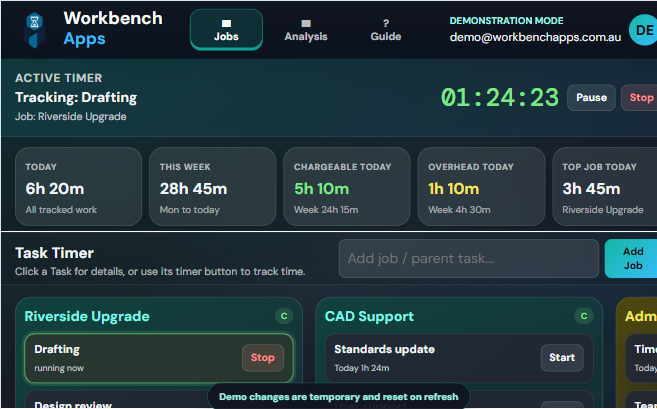
Practical time tracking built around real work.
Task Timer combines a visual Job board with reliable timers, task details, editable entries and weekly reporting.
One-click timers
Start and stop time directly from each Task. Starting another Task automatically stops the current timer.
Jobs and Tasks
Organise client work, projects, administration and overheads into clear Job columns and Task rows.
Task details and to-do lists
Add due dates, completion status and checklist items with their own optional due dates.
Weekly timesheets
Review Job and Task hours by day, with daily totals and a complete week total.
Editable time entries
Correct start and finish times, fix forgotten timers and remove individual entries without clearing other work.
Chargeable and overhead
Separate billable work from overheads and compare totals at a glance.
Flexible Job board
Reorder Jobs and Tasks, collapse columns, resize Jobs and apply colour themes.
Excel export and restore
Export Jobs, Tasks, raw time entries and weekly timesheet tabs, then import a workbook when needed.
Multi-device sync
Your signed-in Task Timer data is stored in Supabase and available across supported devices.
Understand the app in minutes.
The live demo uses fictional Jobs, Tasks and time entries and never writes changes to a database.
Explore the example Jobs
Open the demo and inspect chargeable and overhead Jobs, Tasks, due dates and existing time totals.
Track and edit time
Start a Task, pause or switch timers, open Task details, add to-do items, and correct time entries.
Refresh to reset
Demo changes stay only in browser memory. Refreshing restores the original example dataset.
Demo and full account comparison
The demo shows the working product. A full account adds private saving, syncing, billing and permanent history.
| Capability | Live demo | Full account |
|---|---|---|
| Add Jobs, Tasks and checklist items | Yes | Yes |
| Start, pause, resume, stop and switch timers | Yes | Yes |
| Weekly timesheet, By Task and Edit Time | Yes | Yes |
| Save changes after refresh | No — resets | Yes |
| Private Supabase account storage | No connection | Yes |
| Sync between devices | No | Yes |
Try it with fictional work first.
Use every major feature without creating an account or exposing real client, project or timesheet information.